Showing posts with label LINQ. Show all posts
Showing posts with label LINQ. Show all posts
Thursday, December 1, 2011
Gridview with linq
Download Code
in .Aspx Page
<%@ Page Language="C#" AutoEventWireup="true" CodeFile="gridwithlinq.aspx.cs" Inherits="gridwithlinq" %>
<!DOCTYPE html PUBLIC "-//W3C//DTD XHTML 1.0 Transitional//EN" "http://www.w3.org/TR/xhtml1/DTD/xhtml1-transitional.dtd">
<html xmlns="http://www.w3.org/1999/xhtml">
<head runat="server">
<title>Untitled Page</title>
</head>
<body>
<form id="form1" runat="server">
<div>
<asp:GridView ID="GridView1" runat="server" ShowFooter="true"
AutoGenerateColumns="false" DataKeyNames="id"
onrowcancelingedit="GridView1_RowCancelingEdit"
onrowdeleting="GridView1_RowDeleting" onrowediting="GridView1_RowEditing" onrowupdating="GridView1_RowUpdating"
>
<Columns>
<asp:TemplateField HeaderText="ID">
<ItemTemplate>
<asp:Label ID="lblI" runat="server" Text='<%#Eval("id") %>'></asp:Label>
</ItemTemplate>
<EditItemTemplate>
<asp:Label ID="lblId" runat="server" Text='<%#Eval("id") %>'></asp:Label>
</EditItemTemplate>
<FooterTemplate>
<asp:TextBox ID="txtIId" runat="server"></asp:TextBox>
</FooterTemplate>
</asp:TemplateField>
<asp:TemplateField HeaderText="Name">
<ItemTemplate>
<asp:Label ID="lblName" runat="server" Text='<%#Eval("name") %>'></asp:Label>
</ItemTemplate>
<EditItemTemplate>
<asp:TextBox ID="txtName" runat="server" Text='<%#Eval("name") %>'></asp:TextBox>
</EditItemTemplate>
<FooterTemplate>
<asp:TextBox ID="txtIName" runat="server"></asp:TextBox>
</FooterTemplate>
</asp:TemplateField>
<asp:TemplateField HeaderText="City">
<ItemTemplate>
<asp:Label ID="lblCity" runat="server" Text='<%#Eval("city") %>'></asp:Label>
</ItemTemplate>
<EditItemTemplate>
<asp:TextBox ID="txtCity" runat="server" Text='<%#Eval("city") %>'></asp:TextBox>
</EditItemTemplate>
<FooterTemplate>
<asp:TextBox ID="txtICity" runat="server"></asp:TextBox>
</FooterTemplate>
</asp:TemplateField>
<asp:TemplateField HeaderText="Command">
<ItemTemplate>
<asp:Button ID="btnEdit" runat="server" Text="Edit" CommandName="Edit" />
<asp:Button ID="Delete" runat="server" Text="Delete" CommandName="Delete"/>
</ItemTemplate>
<EditItemTemplate>
<asp:Button ID="btnUpdate" runat="server" Text="Update" CommandName="Update"/>
<asp:Button ID="btnCancel" runat="server" Text="Cancel" CommandName="Cancel"/>
</EditItemTemplate>
<FooterTemplate>
<asp:Button ID="btnInsert" runat="server" Text="Insert"
onclick="btnInsert_Click" />
</FooterTemplate>
</asp:TemplateField>
</Columns>
</asp:GridView>
</div>
</form>
</body>
</html>
in .Aspx Page
<%@ Page Language="C#" AutoEventWireup="true" CodeFile="gridwithlinq.aspx.cs" Inherits="gridwithlinq" %>
<!DOCTYPE html PUBLIC "-//W3C//DTD XHTML 1.0 Transitional//EN" "http://www.w3.org/TR/xhtml1/DTD/xhtml1-transitional.dtd">
<html xmlns="http://www.w3.org/1999/xhtml">
<head runat="server">
<title>Untitled Page</title>
</head>
<body>
<form id="form1" runat="server">
<div>
<asp:GridView ID="GridView1" runat="server" ShowFooter="true"
AutoGenerateColumns="false" DataKeyNames="id"
onrowcancelingedit="GridView1_RowCancelingEdit"
onrowdeleting="GridView1_RowDeleting" onrowediting="GridView1_RowEditing" onrowupdating="GridView1_RowUpdating"
>
<Columns>
<asp:TemplateField HeaderText="ID">
<ItemTemplate>
<asp:Label ID="lblI" runat="server" Text='<%#Eval("id") %>'></asp:Label>
</ItemTemplate>
<EditItemTemplate>
<asp:Label ID="lblId" runat="server" Text='<%#Eval("id") %>'></asp:Label>
</EditItemTemplate>
<FooterTemplate>
<asp:TextBox ID="txtIId" runat="server"></asp:TextBox>
</FooterTemplate>
</asp:TemplateField>
<asp:TemplateField HeaderText="Name">
<ItemTemplate>
<asp:Label ID="lblName" runat="server" Text='<%#Eval("name") %>'></asp:Label>
</ItemTemplate>
<EditItemTemplate>
<asp:TextBox ID="txtName" runat="server" Text='<%#Eval("name") %>'></asp:TextBox>
</EditItemTemplate>
<FooterTemplate>
<asp:TextBox ID="txtIName" runat="server"></asp:TextBox>
</FooterTemplate>
</asp:TemplateField>
<asp:TemplateField HeaderText="City">
<ItemTemplate>
<asp:Label ID="lblCity" runat="server" Text='<%#Eval("city") %>'></asp:Label>
</ItemTemplate>
<EditItemTemplate>
<asp:TextBox ID="txtCity" runat="server" Text='<%#Eval("city") %>'></asp:TextBox>
</EditItemTemplate>
<FooterTemplate>
<asp:TextBox ID="txtICity" runat="server"></asp:TextBox>
</FooterTemplate>
</asp:TemplateField>
<asp:TemplateField HeaderText="Command">
<ItemTemplate>
<asp:Button ID="btnEdit" runat="server" Text="Edit" CommandName="Edit" />
<asp:Button ID="Delete" runat="server" Text="Delete" CommandName="Delete"/>
</ItemTemplate>
<EditItemTemplate>
<asp:Button ID="btnUpdate" runat="server" Text="Update" CommandName="Update"/>
<asp:Button ID="btnCancel" runat="server" Text="Cancel" CommandName="Cancel"/>
</EditItemTemplate>
<FooterTemplate>
<asp:Button ID="btnInsert" runat="server" Text="Insert"
onclick="btnInsert_Click" />
</FooterTemplate>
</asp:TemplateField>
</Columns>
</asp:GridView>
</div>
</form>
</body>
</html>
in .cs page
using System;
using System.Collections;
using System.Configuration;
using System.Data;
using System.Linq;
using System.Web;
using System.Web.Security;
using System.Web.UI;
using System.Web.UI.HtmlControls;
using System.Web.UI.WebControls;
using System.Web.UI.WebControls.WebParts;
using System.Xml.Linq;
public partial class gridwithlinq : System.Web.UI.Page
{
linqDataContext lb = new linqDataContext();
protected void Page_Load(object sender, EventArgs e)
{
if (!IsPostBack)
{
bind_Grid();
}
}
protected void GridView1_RowUpdating(object sender, GridViewUpdateEventArgs e)
{
GridViewRow row;
row = GridView1.Rows[e.RowIndex];
Label id = row.FindControl("lblId") as Label;
TextBox name = row.FindControl("txtName") as TextBox;
TextBox city = row.FindControl("txtCity") as TextBox;
detail d = lb.details.First(p => p.ID.Equals(Convert.ToInt32(id.Text)));
d.name = name.Text;
d.city = city.Text;
lb.SubmitChanges();
GridView1.EditIndex = -1;
bind_Grid();
}
protected void GridView1_RowEditing(object sender, GridViewEditEventArgs e)
{
GridView1.EditIndex = e.NewEditIndex;
bind_Grid();
}
protected void GridView1_RowDeleting(object sender, GridViewDeleteEventArgs e)
{
int id;
id = Convert.ToInt32(GridView1.DataKeys[e.RowIndex].Value);
detail d=lb.details.First(p=>p.ID.Equals(id));
lb.details.DeleteOnSubmit(d);
lb.SubmitChanges();
bind_Grid();
}
protected void GridView1_RowCancelingEdit(object sender, GridViewCancelEditEventArgs e)
{
GridView1.EditIndex = -1;
bind_Grid();
}
protected void btnInsert_Click(object sender, EventArgs e)
{
TextBox id = GridView1.FooterRow.FindControl("txtIId") as TextBox;
TextBox name = GridView1.FooterRow.FindControl("txtIName") as TextBox;
TextBox city = GridView1.FooterRow.FindControl("txtICity") as TextBox;
detail d = new detail();
d.ID = Convert.ToInt32(id.Text);
d.name = name.Text;
d.city = city.Text;
lb.details.InsertOnSubmit(d);
lb.SubmitChanges();
bind_Grid();
}
protected void bind_Grid()
{
GridView1.DataSource = lb.details.ToList();
GridView1.DataBind();
}
}
12:58 AM 0
Thursday, November 17, 2011
Joins in LINQ to SQL
The following post shows how to write different types of joins in LINQ to SQL. I am using the Northwind database and LINQ to SQL for these examples.
NorthwindDataContext dataContext = new NorthwindDataContext();Inner Join
var q1 = from c in dataContext.Customersjoin o in dataContext.Orders on c.CustomerID equals o.CustomerIDselect new{c.CustomerID,
c.ContactName,
o.OrderID,
o.OrderDate
};
SELECT [t0].[CustomerID], [t0].[ContactName], [t1].[OrderID], [t1].[OrderDate]FROM [dbo].[Customers] AS [t0]
INNER JOIN [dbo].[Orders] AS [t1] ON [t0].[CustomerID] = [t1].[CustomerID]
Left Join
var q2 = from c in dataContext.Customersjoin o in dataContext.Orders on c.CustomerID equals o.CustomerID into gfrom a in g.DefaultIfEmpty()select new{c.CustomerID,
c.ContactName,
a.OrderID,
a.OrderDate
};
SELECT [t0].[CustomerID], [t0].[ContactName], [t1].[OrderID] AS [OrderID], [t1].[OrderDate] AS [OrderDate]
FROM [dbo].[Customers] AS [t0]
LEFT OUTER JOIN [dbo].[Orders] AS [t1] ON [t0].[CustomerID] = [t1].[CustomerID]
Inner Join on multiple
//We mark our anonymous type properties as a and b otherwise//we get the compiler error "Type inferencce failed in the call to 'Join’var q3 = from c in dataContext.Customersjoin o in dataContext.Orders on new { a = c.CustomerID, b = c.Country } equals new { a = o.CustomerID, b = "USA" }
select new{c.CustomerID,
c.ContactName,
o.OrderID,
o.OrderDate
};
SELECT [t0].[CustomerID], [t0].[ContactName], [t1].[OrderID], [t1].[OrderDate]FROM [dbo].[Customers] AS [t0]
INNER JOIN [dbo].[Orders] AS [t1] ON ([t0].[CustomerID] = [t1].[CustomerID]) AND ([t0].[Country] = @p0)
Inner Join on multiple with ‘OR’ clause
var q4 = from c in dataContext.Customersfrom o in dataContext.Orders.Where(a => a.CustomerID == c.CustomerID || c.Country == "USA")
select new{c.CustomerID,
c.ContactName,
o.OrderID,
o.OrderDate
};
SELECT [t0].[CustomerID], [t0].[ContactName], [t1].[OrderID], [t1].[OrderDate]FROM [dbo].[Customers] AS [t0], [dbo].[Orders] AS [t1]
WHERE ([t1].[CustomerID] = [t0].[CustomerID]) OR ([t0].[Country] = @p0)
Left Join on multiple with ‘OR’ clause
var q5 = from c in dataContext.Customersfrom o in dataContext.Orders.Where(a => a.CustomerID == c.CustomerID || c.Country == "USA").DefaultIfEmpty()
select new{c.CustomerID,
c.ContactName,
o.OrderID,
o.OrderDate
};
SELECT [t0].[CustomerID], [t0].[ContactName], [t1].[OrderID] AS [OrderID], [t1].[OrderDate] AS [OrderDate]
FROM [dbo].[Customers] AS [t0]
LEFT OUTER JOIN [dbo].[Orders] AS [t1] ON ([t1].[CustomerID] = [t0].[CustomerID]) OR ([t0].[Country] = @p0)
4:14 AM 0
Wednesday, November 16, 2011
C# 3.0 for Beginners - Learning LINQ - An Overview
- Identify the data source
- Query creation
- Query execution
Calling the method would show you the currently running Internet Explorer processes (their process ids). The heart of the method lies in the following statement of our program.
This form of query is called a method-based query and the arguments to the query operators are called lambda expressions. They allow query operators to be defined individually as methods and are connected using the dot notation. I will deal with lambda expressions in my following posts.
3:20 AM 0
Sunday, October 16, 2011
Creating a Simple Search Function Using LINQ in C#.NET And Highlighting Results With JavaScript
One of the many things that almost every website or be it web application needs is a simple search functionality. It is as simple as pie and yet when I first needed to make one it had me a bit stumped. So today I will show how to make a very simple, but effective site search.
Presuming that you are underway of making your web application and that you are familiar with basic C# and LINQ, the actual code is very simple.
// Code for searching “customer” table with “f_name” or “l_name” containing search string.
public static IQueryable searchCustomers(string value)
{
myDataClass db = new myDataClass();
var q = from c in db.customers
where c.f_name.Contains(value) || c.l_name.Contains(value)
select c;
return q;
}
Simple as pie. This will return an object of type IQueryable which contains entries of type “customer” table where the first name or last name matches the given search string. I find that using IQueryable is a much better approach to data access definitions since it provides me with the full functionality of LINQ in my page’s code behind file. Also, IQueryable types bind right away to any ASP.NET grid controls you might want to use to display the results.
Now another useful functionality I like to give is result-highlighting. I don’t like colored highlights, just a simple bold on the part of the text that matches my search. Especially useful if you are searching through a long text body of some kind. For this i advise using Javascript. Js does the job just as well without adding to server load or extending time on page load. To do this we need only 2 things, the search string and the id of the container in which we are displaying search results.
// Code for highlighting the relevant text in search results
<script type=”text/javascript”>
function highlightOnLoad() {
if (/s\=/.test(window.location.search))
{
var searchString = getSearchString();
// Starting node, parent to all nodes you want to search
var resultContainer = document.getElementById(“search-results-container”);
var searchValues = searchString.split(‘|’);
for (var i in searchValues) {
// The regex is the most important part, it allows the text within tag declarations to not be considered
var regex = new RegExp(“>([^<]*)?(“+searchValues[i]+”)([^>]*)?<”,”ig”);
highlightText(resultContainer, regex, i);
}
function getSearchString() {
// Strip url of other text
var searchString = window.location.search.replace(/[a-zA-Z0-9\?\&\=\%\#]+s\=(\w+)(\&.*)?/,”$1″);
return searchString.replace(/\%20|\+/g,”\|”);
}
function highlightText(container, regex, termid) {
var temp = container.innerHTML;
// Add a span with class of ‘highlighted’
container.innerHTML = temp.replace(regex,’>$1<span class=”highlighted”>$2</span>$3<’);
}
window.OnLoad = highlightOnLoad;
</script>
The CSS code for highlighted portions of text :
<style type=”text/css”>
span.highlighted {
background-color: #161616;
font-weight: bold;
}
background-color: #161616;
font-weight: bold;
}
</style>
So as you can see in a matter of 10 minutes, you can add a very nice (yet simple) search functionality to all your websites.
2:44 AM 0
Monday, October 10, 2011
Group by Multiple Columns using Anonymous Types in LINQ to SQL
With the power of Anonymous Types, I was able to create a number of reports with different grouping senarios. Anonymous Types as defined in the C# programming guide:
Anonymous types provide a convenient way to encapsulate a set of read-only properties into a single object without having to first explicitly define a type. The type name is generated by the compiler and is not available at the source code level. The type of the properties is inferred by the compiler.
Let’s look at a few ways of Grouping using Anonymous Types. Before we start, displayed below is the sample data used in the queries below:

Simple Group by Anonymous Type – Grouping by Month and Year in a Date
The purpose of this query is to group transactions in the table and retrieve a list of unique months and years in a simple list.var months = from t in db.TransactionDatagroup t by new { month = t.Date.Month, year = t.Date.Year } into dselect new { t.Key.month, t.Key.year };
Group by Database Column and then by Anonymous Type – Grouping by Expense Category and Monthly Total
The purpose of this query is to group all database records by Category first and then display a Total Expense based on the month in a simple list.var categoryExpense = from t in db.TransactionDatagroup t by t.Category into g
select new{Category = g.Key,
Items = from i in ggroup i by new { month = i.Date.Month, year = i.Date.Year } into dselect new { Date = String.Format("{0}/{1}", d.Key.month, d.Key.year ), Amt = d.Sum(s => s.Amount) }
};

Group by Anonymous Type and then by Database Column – Grouping by Month and then by Expense Category and Category Total
The purpose of this query is the opposite of the group query 2. We will first group by the Month and then group by the Category Total:var monthlyExpenses = from t in db.TransactionDatagroup t by new { month = y.Date.Month, year = y.Date.Year } into gselect new{Month = String.Format("{0}/{1}", g.Key.month, g.Key.year),Items = from i in ggroup i by new { i.Category } into dselect new{Amt = d.Sum(s => s.Amount)
}
};

With SQL you can seamlessly do all of the above on XML, CSV files or .NET Objects as well.
Recommend Resources to Learn more about LINQ to SQL
1:00 AM 0
Tuesday, October 4, 2011
Using LINQ to SQL -1
Over the last few months I wrote a series of blog posts that covered some of the new language features that are coming with the Visual Studio and .NET Framework "Orcas" release. Here are pointers to the posts in my series:
- Automatic Properties, Object Initializer and Collection Initializers
- Extension Methods
- Lambda Expressions
- Query Syntax
- Anonymous Types
Developers can use LINQ with any data source. They can express efficient query behavior in their programming language of choice, optionally transform/shape data query results into whatever format they want, and then easily manipulate the results. LINQ-enabled languages can provide full type-safety and compile-time checking of query expressions, and development tools can provide full intellisense, debugging, and rich refactoring support when writing LINQ code.
LINQ supports a very rich extensibility model that facilitates the creation of very efficient domain-specific operators for data sources. The "Orcas" version of the .NET Framework ships with built-in libraries that enable LINQ support against Objects, XML, and Databases.
What Is LINQ to SQL?
LINQ to SQL is an O/RM (object relational mapping) implementation that ships in the .NET Framework "Orcas" release, and which allows you to model a relational database using .NET classes. You can then query the database using LINQ, as well as update/insert/delete data from it.LINQ to SQL fully supports transactions, views, and stored procedures. It also provides an easy way to integrate data validation and business logic rules into your data model.
Modeling Databases Using LINQ to SQL:
Visual Studio "Orcas" ships with a LINQ to SQL designer that provides an easy way to model and visualize a database as a LINQ to SQL object model. My next blog post will cover in more depth how to use this designer (you can also watch this video I made in January to see me build a LINQ to SQL model from scratch using it).Using the LINQ to SQL designer I can easily create a representation of the sample "Northwind" database like below:
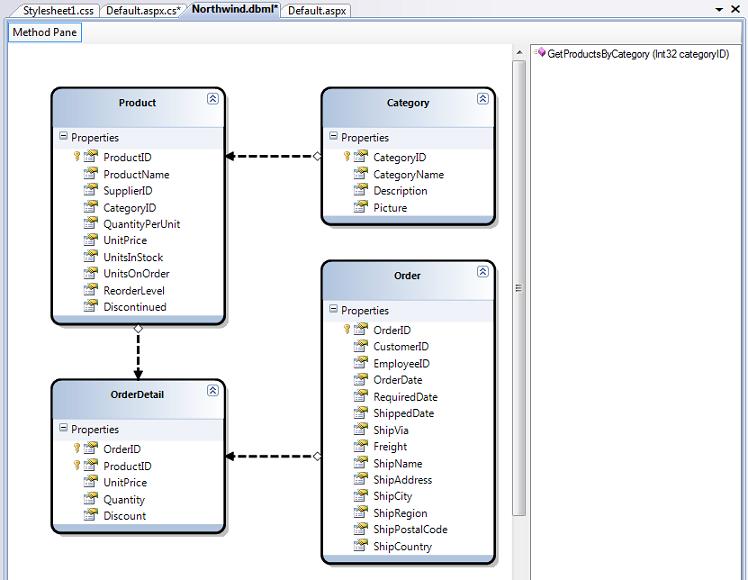
My LINQ to SQL design-surface above defines four entity classes: Product, Category, Order and OrderDetail. The properties of each class map to the columns of a corresponding table in the database. Each instance of a class entity represents a row within the database table.
The arrows between the four entity classes above represent associations/relationships between the different entities. These are typically modeled using primary-key/foreign-key relationships in the database. The direction of the arrows on the design-surface indicate whether the association is a one-to-one or one-to-many relationship. Strongly-typed properties will be added to the entity classes based on this. For example, the Category class above has a one-to-many relationship with the Product class. This means it will have a "Categories" property which is a collection of Product objects within that category. The Product class then has a "Category" property that points to a Category class instance that represents the Category to which the Product belongs.
The right-hand method pane within the LINQ to SQL design surface above contains a list of stored procedures that interact with our database model. In the sample above I added a single "GetProductsByCategory" SPROC. It takes a categoryID as an input argument, and returns a sequence of Product entities as a result. We'll look at how to call this SPROC in a code sample below.
Understanding the DataContext Class
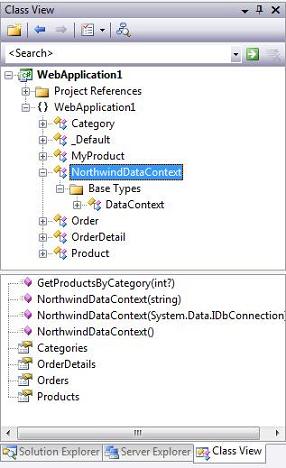
When you press the "save" button within the LINQ to SQL designer surface, Visual Studio will persist out .NET classes that represent the entities and database relationships that we modeled. For each LINQ to SQL designer file added to our solution, a custom DataContext class will also be generated. This DataContext class is the main conduit by which we'll query entities from the database as well as apply changes. The DataContext class created will have properties that represent each Table we modeled within the database, as well as methods for each Stored Procedure we added.
For example, below is the NorthwindDataContext class that is persisted based on the model we designed above:
LINQ to SQL Code Examples
Once we've modeled our database using the LINQ to SQL designer, we can then easily write code to work against it. Below are a few code examples that show off common data tasks:1) Query Products From the Database
The code below uses LINQ query syntax to retrieve an IEnumerable sequence of Product objects. Note how the code is querying across the Product/Category relationship to only retrieve those products in the "Beverages" category:C#:

VB:

2) Update a Product in the Database
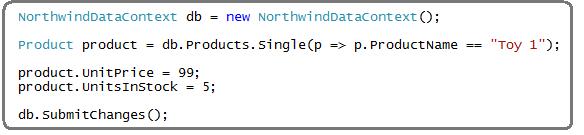
The code below demonstrates how to retrieve a single product from the database, update its price, and then save the changes back to the database:C#:
VB:
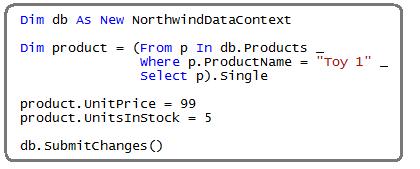
Note: VB in "Orcas" Beta1 doesn't support Lambdas yet. It will, though, in Beta2 - at which point the above query can be rewritten to be more concise.
3) Insert a New Category and Two New Products into the Database
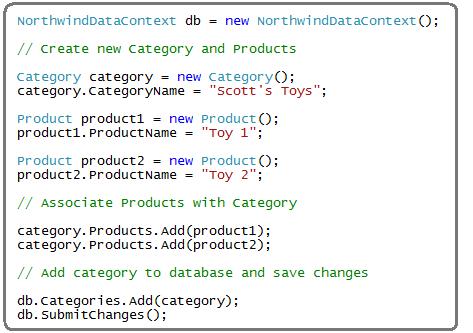
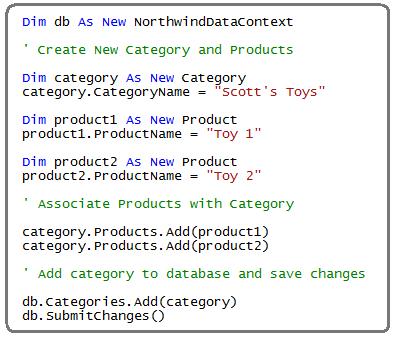
The code below demonstrates how to create a new category, and then create two new products and associate them with the category. All three are then saved into the database.Note below how I don't need to manually manage the primary key/foreign key relationships. Instead, just by adding the Product objects into the category's "Products" collection, and then by adding the Category object into the DataContext's "Categories" collection, LINQ to SQL will know to automatically persist the appropriate PK/FK relationships for me.
C#
VB:
4) Delete Products from the Database
The code below demonstrates how to delete all Toy products from the database:C#:
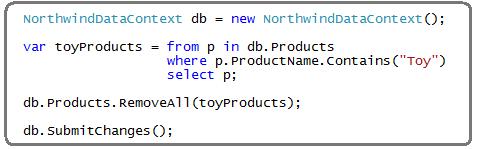
VB:
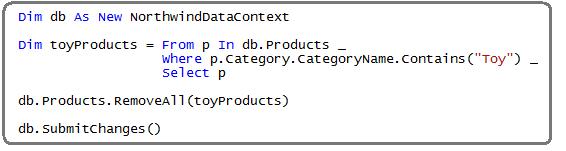
5) Call a Stored Procedure
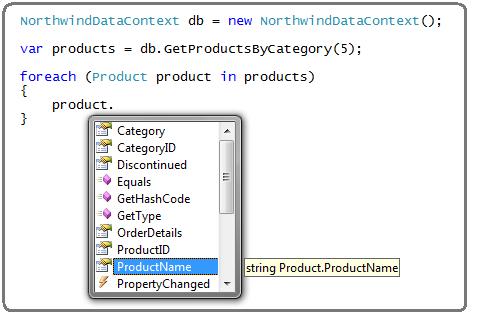
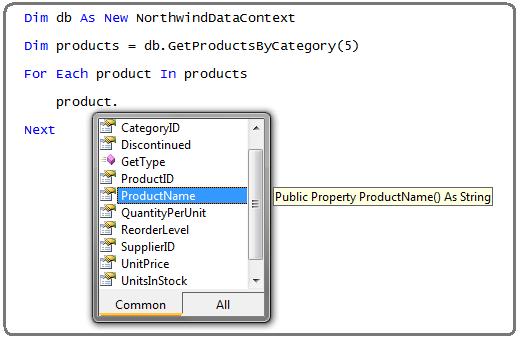
The code below demonstrates how to retrieve Product entities not using LINQ query syntax, but rather by calling the "GetProductsByCategory" stored procedure we added to our data model above. Note that once I retrieve the Product results, I can update/delete them and then call db.SubmitChanges() to persist the modifications back to the database.C#:
VB:
6) Retrieve Products with Server Side Paging
The code below demonstrates how to implement efficient server-side database paging as part of a LINQ query. By using the Skip() and Take() operators below, we'll only return 10 rows from the database - starting with row 200.C#:

VB:

Summary
LINQ to SQL provides a nice, clean way to model the data layer of your application. Once you've defined your data model you can easily and efficiently perform queries, inserts, updates and deletes against it.Hopefully the above introduction and code samples have helped whet your appetite to learn more. Over the next few weeks I'll be continuing this series to explore LINQ to SQL in more detail.
Hope this helps,
6:21 AM 0
Subscribe to:
Posts (Atom)
